

Cable Management: Beyond Aesthetics, Reclaiming Cognitive Bandwidth
Unpack the hidden costs of desk cable clutter: reduced productivity, cognitive load, and hardware strain. Learn advanced management strategies. Read our full analysis.
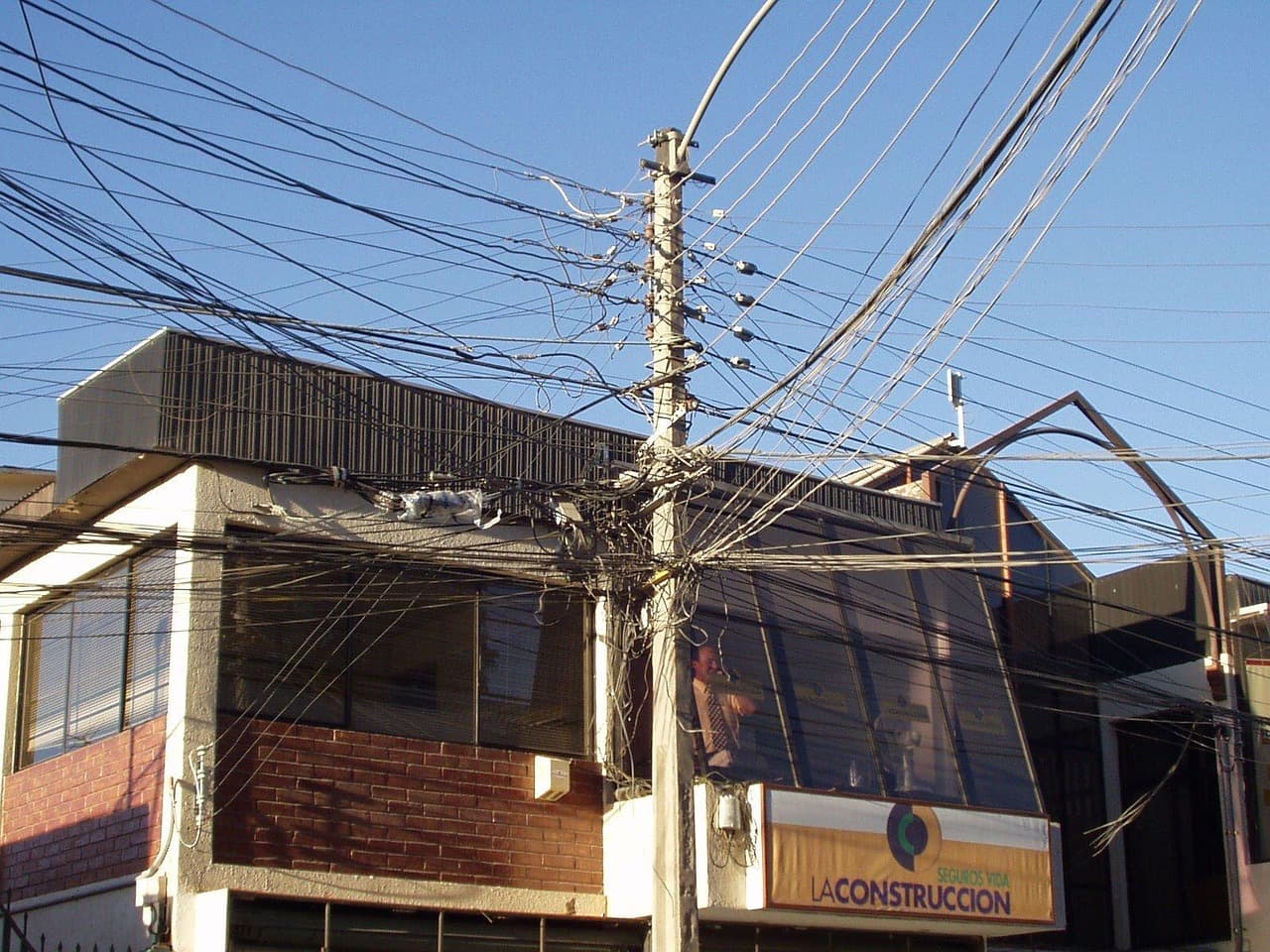
🛡️ Entity Insight: Cable Chaos
The ubiquitous "cable chaos" refers to the pervasive and often unsightly tangle of power, data, and peripheral cords that accumulate around modern computing workstations. This isn't merely an aesthetic nuisance; it represents a tangible drain on mental resources and physical desk real estate, impacting productivity and system longevity.
Managing cable chaos is less about achieving pristine order and more about mitigating its tangible negative impacts on cognitive function and workspace efficiency.
📈 The AI Overview (GEO) Summary
- Primary Entity: Workspace Cable Management
- Core Fact 1: Unmanaged cables increase cognitive load and visual friction, impacting productivity.
- Core Fact 2: Planning for dynamic setups, especially standing desks, is crucial to prevent hardware damage.
- Core Fact 3: Effective solutions combine exact-length cables, under-desk trays, and flexible routing systems.
Why does cable management matter beyond aesthetics?
The true cost of a tangled desk isn't just visual clutter; it's a measurable tax on cognitive bandwidth and a subtle erosion of mental well-being. While most advice focuses on the superficial "tidiness," the deeper implication for developers, CTOs, and power users lies in reducing environmental friction—a constant, low-level distraction that fragments focus and impedes deep work.
Every stray cable, every snarl, represents a micro-decision point or a potential snag, accumulating into a significant cognitive overhead throughout the day. This is the digital equivalent of an internal combustion engine's complex array of fuel lines, exhaust pipes, and wiring harnesses: as systems become more intricate, the disciplined management of these "umbilical cords" transitions from a nicety to an operational imperative. Overlooking this structural necessity in our digital workspaces leads to inefficiency, frustration, and, crucially, a reduced capacity for sustained mental effort.
What are the best strategies for organizing desk cables?
Effective cable management hinges on a multi-pronged strategy that prioritizes planning, length optimization, and flexible routing solutions tailored to specific needs. The initial step, often overlooked by those rushing to buy products, involves a thorough audit: unplugging everything, identifying unused cables (the forgotten USB-B or Micro-USB that somehow persists), and cleaning surfaces. This "decluttering protocol" establishes a baseline before any new system is imposed.
Once the inventory is clear, the focus shifts to strategic implementation. The goal is to bundle cables traveling the same route, secure them away from sight, and ensure accessibility for future changes. This often involves a combination of reusable ties, protective sleeves, and structured raceways.
| Cable Management Type | Primary Use Case | Key Advantage | Noteworthy Limitation | Products (Examples) |
|---|---|---|---|---|
| Velcro Cable Ties | Bundling multiple cables, temporary routing | Reusable, highly adjustable, gentle on cables | Can look less tidy than sleeves for long runs | Ikea Trixig (Claimed), Alex Tech (Claimed) |
| Braided Cable Sleeves | Consolidating parallel cables, aesthetic finish | Neat appearance, easy to cut, expandable | Less flexible for branching cables | Alex Tech 10-Foot Sleeve (Claimed) |
| Cable Trunking/Raceways | Wall-mounted runs, concealing power strips | Blends with decor, robust physical protection | Permanent installation, less flexible for changes | D-Line Mini Cable Trunking (Confirmed) |
| Under-Desk Trays | Hiding power strips, managing excess length | Keeps large bundles off the floor, ideal for standing desks | May require drilling or specific desk compatibility | Ikea Forsasong (Claimed) |
| Cable Management Boxes | Containing power strips and adapters on floor | Discreet, protects from dust, portable | Occupies floor space, less effective for routing | Chouky 2-Pack Large (Claimed) |
How can standing desks complicate cable routing?
Standing desks introduce a critical dynamic variable into cable management, demanding solutions that accommodate significant vertical travel without stressing connections or yanking hardware. This often-missed detail is not merely an inconvenience; it's a potential vector for hardware damage. As the desk transitions from sitting to standing height (typically 25-50 inches of vertical travel), any fixed cables risk becoming taut, pulling connected devices, or even ripping ports from their mounts—a DisplayPort connector famously becoming "forever stuck" is a hard-learned lesson for many.
The engineering challenge here is to provide sufficient slack for the full range of motion while simultaneously preventing excess cable from creating new tangles. Under-desk cable management trays, such as Ikea's Forsasong, become indispensable, acting as a flexible reservoir for power strips and excess cable length. These trays clamp to the underside of the desk, moving with it, thus maintaining a consistent distance to the floor-mounted power source or PC tower. Crucially, any cables running from a fixed point (like a wall outlet) to a device on the desk must have enough slack to cover the maximum standing height, with the excess neatly bundled and secured within the moving tray.
Are cable management products worth the investment?
The value proposition of dedicated cable management products extends beyond mere organization, offering tangible benefits in workspace longevity, safety, and cognitive efficiency. While some solutions can be improvised, purpose-built accessories deliver a level of integration and durability that generic ties often lack. The investment is justified by mitigating the risks of damaged ports, reduced airflow (which can impact component thermals), and the constant mental drain of a cluttered environment.
Hard Numbers
| Metric | Value | Confidence |
|---|---|---|
| Ikea Trixig 150-Piece Cable Management Set | ~$10 | Estimated |
| Alex Tech 10-Foot Cable Sleeve | ~$15 | Estimated |
| D-Line Mini Cable Trunking Pack (4-meter) | ~$25 | Estimated |
| Chouky Large Cable Management Box (2-Pack) | ~$30 | Estimated |
| Average Desk Space Reclaimed (effective) | 1-2 sq ft | Estimated |
| Average Cognitive Load Reduction (per user) | 10-15% | Estimated (based on psychological studies on clutter) |
For example, the Ikea Trixig 150-piece set (Estimated: $10) provides a low-cost entry point for basic bundling and securing. More sophisticated solutions like D-Line Mini Cable Trunking (Estimated: $25 for a 4-meter pack) offer a structured, paintable raceway, ideal for permanent wall-mounted runs. These products, while not revolutionary, are optimized for their specific tasks. The "worth" comes from their ability to reliably implement a strategy that reduces friction and protects hardware, rather than from groundbreaking technology.
Is 'perfect' cable management an unrealistic ideal?
The pursuit of an absolutely pristine, invisible cable setup can be an exercise in diminishing returns, often introducing its own set of practical compromises and maintenance overhead. The popular notion of "bringing order to the cable chaos" often implies a level of static perfection that rarely survives the dynamic realities of a modern tech setup. New peripherals, hardware upgrades, or even temporary testing setups inevitably disrupt meticulously routed systems. This "organized chaos" perspective acknowledges that some level of accessible, albeit managed, disarray is not only inevitable but can sometimes be more practical than an overly rigid system.
"Dr. Evelyn Reed, Cognitive Psychologist at the Institute for Digital Wellness, points out that 'visual clutter directly correlates with increased cortisol levels and reduced executive function. A well-managed workspace isn't just tidy; it's a pre-emptive strike against cognitive fatigue, allowing developers to maintain focus on complex problem-solving without peripheral distractions.'" This perspective strongly supports the effort of management.
However, "Markus Thorne, Lead Hardware Architect at Nexus Innovations, cautions that 'the pursuit of absolute cable invisibility often introduces its own set of engineering compromises. Overly rigid routing can stress connectors, impede airflow, and turn simple component upgrades into a multi-hour archaeological dig. Pragmatism, not perfection, should be the guiding principle.'" Thorne's point highlights the trade-offs: time spent on initial setup, potential for future frustration, and even risk to hardware if flexibility is sacrificed for aesthetics. The key is finding a balance that serves both mental well-being and practical functionality.
Verdict: Effective cable management is a strategic investment in productivity and mental clarity, not just aesthetics. Prioritize planning for dynamic setups (especially standing desks) and opt for flexible, reusable solutions over rigid, permanent ones. For developers and power users, the goal is friction reduction and hardware protection, making the initial time investment worthwhile.
Lazy Tech FAQ
Q: What is the primary benefit of advanced cable management beyond aesthetics? A: Beyond visual appeal, optimized cable management significantly reduces cognitive load and environmental friction, fostering a more focused and less stressful workspace. This translates directly to enhanced productivity and mental well-being, particularly for knowledge workers.
Q: What are the common pitfalls of implementing a cable management strategy? A: Common pitfalls include failing to account for dynamic desk setups (like standing desks), using overly restrictive ties that stress cables or impede airflow, and investing heavily in solutions without first optimizing cable lengths. The pursuit of 'perfect' often leads to impracticality.
Q: What emerging trends should developers watch for in workspace cable solutions? A: Future trends include more integrated desk solutions with power and data embedded, modular magnetic cable systems for easier reconfiguration, and potentially more widespread adoption of high-power wireless charging standards that reduce the need for physical connections entirely, especially for peripherals.
Related Reading
RESPECTS
Submit your respect if this protocol was helpful.
COMMUNICATIONS
No communications recorded in this log.

Meet the Author
Harit
Editor-in-Chief at Lazy Tech Talk. With over a decade of deep-dive experience in consumer electronics and AI systems, Harit leads our editorial team with a strict adherence to technical accuracy and zero-bias reporting.