

MasteringClaudeCode:5AIAgentSkillsforDevelopers
Unlock Claude Code's full potential. Learn 5 essential AI agent skills for developers to steer code generation, refine outputs, and integrate AI into your daily workflow. See the full setup guide.

📋 At a Glance
- Difficulty: Advanced
- Time required: Ongoing practice (initial setup ~15-30 minutes, mastering skills ~weeks to months)
- Prerequisites: Active Anthropic API key or access to Claude Pro/Team, fundamental programming knowledge (e.g., Python, JavaScript, TypeScript), basic understanding of Git, and a development environment (IDE, terminal).
- Works on: Any operating system (Windows, macOS, Linux) with internet access for API interaction. Local execution of generated code requires a compatible environment.
#How Do I Architect Effective AI Agentic Workflows with Claude Code?
Architecting effective AI agentic workflows with Claude Code involves treating the AI as a collaborative, process-driven entity, not just a static prompt-responder, by defining clear objectives, constraints, and iterative steps. This approach leverages Claude's capabilities to break down complex problems, execute sub-tasks, and integrate feedback, ensuring a structured and predictable development cycle that dramatically improves code quality and maintainability. It moves beyond single-shot prompting to a series of guided interactions, making the human developer the ultimate orchestrator of the AI's actions.
The true power of Claude Code as an AI agent lies in its ability to participate in a structured workflow. This isn't about asking a single question and expecting a perfect answer; it's about defining a process, setting clear boundaries, and guiding the AI through multiple steps. Think of yourself as the lead architect, and Claude as a highly capable but direction-dependent junior engineer.
1. Define the Meta-Prompt and Persona
What: Establish a clear "System Prompt" or meta-prompt that defines Claude's role, overall objective, and operational constraints for the entire session or project. Why: This foundational step sets the context and expectations for all subsequent interactions, ensuring Claude operates within a consistent framework. Without it, Claude might drift in its responses or fail to adhere to specific coding standards or architectural patterns. It's the equivalent of onboarding a human engineer with the project's vision and their specific responsibilities. How: When initiating a new conversation or project with Claude, start with a detailed system prompt.
You are a Senior TypeScript Engineer specialized in building scalable backend services using Node.js, Express, and PostgreSQL. Your primary goal is to generate clean, well-tested, and idiomatic TypeScript code.
Adhere strictly to SOLID principles, functional programming paradigms where appropriate, and always prioritize type safety.
You will receive tasks, generate code, and then be asked to critically review your own output based on provided test cases or architectural guidelines.
If a task involves external tools or dependencies, clearly state them.
Your responses should always include code blocks with language identifiers, followed by a concise explanation of the changes or logic.
Verify: Observe Claude's initial responses to simple requests. Does it acknowledge its persona? Does it mention the constraints? For instance, if you ask for a simple function, it should automatically consider type safety or mention testing.
✅ You should see Claude's responses reflecting the persona and constraints, e.g., "As a Senior TypeScript Engineer, I'll ensure this function is type-safe..."
2. Break Down Complex Problems into Atomic Tasks
What: Decompose a large development goal into smaller, discrete, and manageable sub-tasks that can be addressed sequentially by Claude. Why: LLMs perform best when given focused, unambiguous tasks. Overloading Claude with a monolithic problem increases the likelihood of errors, incomplete solutions, or "hallucinations." Breaking it down allows for incremental progress, easier debugging, and more precise feedback loops. How: Instead of "Build a full e-commerce backend," start with:
- "Design the database schema for products and orders."
- "Create a REST API endpoint for product listing."
- "Implement input validation for creating a new product."
- "Write unit tests for the product creation endpoint."
Verify: After providing the first sub-task, Claude should respond with a focused solution relevant only to that sub-task, not attempting to solve the entire problem.
✅ Claude should generate a database schema, for example, without immediately jumping into API routes or authentication logic.
3. Establish Clear Input and Output Contracts
What: Explicitly define the expected input format for your prompts and the desired output format from Claude for each interaction. Why: Ambiguity in communication leads to unpredictable results. By specifying formats (e.g., "Provide JSON output," "Use Markdown code blocks," "Generate a Git diff"), you streamline parsing, integration into your workflow, and verification. This is crucial for automation and consistent results. How: Include format requirements directly in your prompts.
Please refactor the following TypeScript function to use modern ES modules and adhere to functional purity.
<function_to_refactor>
After refactoring, provide the updated code in a TypeScript Markdown block, followed by a `diff -u` output showing the exact changes.
Verify: Claude's output should strictly adhere to the requested format. If you asked for JSON, it must be valid JSON. If diff, it must be a proper diff.
✅ The output should be a valid TypeScript code block and a
diff -ublock, correctly highlighting changes.
#What Are the Core Prompting Strategies for Steering Claude Code?
Effective steering of Claude Code relies on five core prompting strategies: explicit role assignment, structured output requirements, iterative refinement directives, constraint-based problem solving, and test-driven instruction. These strategies move beyond simple requests, enabling developers to harness Claude's agentic capabilities for generating high-quality, relevant, and verifiable code within specific project parameters, thereby minimizing rework and maximizing efficiency.
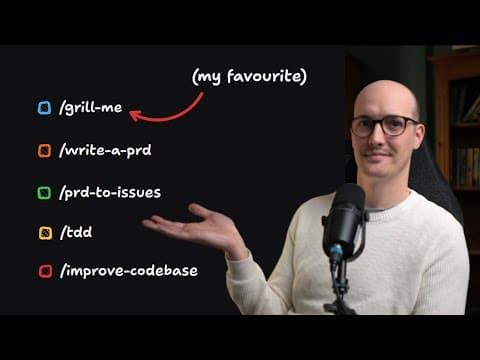
The video highlights "5 Claude Code skills I use every single day." While the exact skills aren't detailed in the transcript, these five strategies encapsulate the essence of "steering" an AI agent for code quality, based on current best practices for advanced LLM interaction in development.
1. Explicit Role Assignment
What: Clearly define Claude's role and expertise for the specific task at hand. Why: Assigning a role (e.g., "Senior React Component Developer," "DevOps Engineer," "SQL Query Optimizer") primes Claude to access relevant knowledge domains and adopt a specific problem-solving mindset. This narrows its focus and improves the relevance and quality of its output. It prevents generic, unopinionated responses. How: Prefix your prompts with a persona statement.
As an expert Python developer specializing in FastAPI and Pydantic, generate a new endpoint for a user registration service.
It should accept a UserCreate schema (email: str, password: str) and return a UserRead schema (id: int, email: str).
Ensure password hashing with `passlib.hash.bcrypt`.
Verify: Claude's response should reflect the assigned role, using terminology and patterns appropriate for that domain (e.g., mentioning FastAPI decorators, Pydantic models).
✅ Claude's generated code should include FastAPI route definitions, Pydantic models for request/response, and
bcryptusage.
2. Structured Output Requirements
What: Mandate specific output formats for Claude's responses. Why: Structured outputs are critical for automated processing, easy readability, and integration into existing tools. It reduces parsing overhead and ensures consistency, which is vital for any advanced workflow. This prevents Claude from rambling or providing unformatted text. How: Specify the format in your prompt.
Generate a JSON object containing a list of common HTTP status codes (e.g., 200, 404, 500) and their descriptions.
The JSON should be an array of objects, each with 'code' (integer) and 'description' (string) properties.
[
  {
    "code": 200,
    "description": "OK"
  },
  {
    "code": 404,
    "description": "Not Found"
  },
  {
    "code": 500,
    "description": "Internal Server Error"
  }
]
Verify: The output should be strictly valid JSON (or whatever format was requested), without extra conversational text outside the specified format.
✅ The response should contain only the valid JSON array, ready for parsing.
3. Iterative Refinement Directives
What: Instruct Claude on how to handle feedback and perform subsequent modifications based on previous outputs. Why: Code generation is rarely perfect on the first attempt. By explicitly guiding Claude on how to iterate, you create a feedback loop that allows for continuous improvement, error correction, and feature expansion without losing context. This is the cornerstone of agentic behavior. How: Provide specific instructions for refinement.
Here is the previous code:
```typescript
// ... previous code ...
The getUserById function is missing error handling for when the user is not found. Modify it to throw a NotFoundError if user is null, defined in src/errors.ts.
**Verify**: Claude should modify *only* the specified part of the code, incorporating the new requirements and referencing the provided context.
> ✅ The updated code should include the `NotFoundError` throw, and Claude's explanation should detail this specific change.

### 4. Constraint-Based Problem Solving
**What**: Impose strict limitations and requirements on the generated code, such as specific libraries, architectural patterns, or performance goals.
**Why**: Constraints prevent Claude from generating unidiomatic, inefficient, or incompatible code. They ensure the output aligns with your project's existing codebase, standards, and technical stack, reducing integration effort and technical debt.
**How**: Include negative and positive constraints in your prompts.

```text
Implement a data caching mechanism for the `fetchProductDetails` function.
Do NOT use external caching libraries; implement a simple in-memory cache using a Map.
The cache should expire items after 5 minutes.
Verify: Review the generated code to confirm that all specified constraints were met (e.g., no external libraries were imported, a Map was used, and the expiration logic is present).
✅ The code should demonstrate an in-memory
Map-based cache with a clear 5-minute expiration logic, without anyimportstatements for caching libraries.
5. Test-Driven Instruction
What: Provide unit tests or integration tests before asking Claude to write the corresponding code, or instruct Claude to generate tests first. Why: This strategy forces Claude to focus on meeting concrete, verifiable requirements. It acts as a robust specification, minimizing ambiguity and ensuring the generated code is functional and correct by design. It's a powerful way to define "done." How: Present test cases as part of the initial prompt.
Write a TypeScript function `calculateDiscountedPrice(price: number, discountPercentage: number)` that applies a discount to a price.
It must pass the following tests:
- `calculateDiscountedPrice(100, 10)` should return `90`.
- `calculateDiscountedPrice(50, 0)` should return `50`.
- `calculateDiscountedPrice(200, 25)` should return `150`.
Verify: Claude's generated function should directly address and pass all provided test cases. You can then copy and run these tests against the generated code.
✅ The
calculateDiscountedPricefunction should correctly implement the discount logic and pass all provided test cases.
#How Can I Implement Iterative Refinement and Feedback Loops with Claude Code?
Implementing effective iterative refinement with Claude Code requires a structured approach to providing feedback, utilizing version control for changes, and maintaining conversational context across multiple turns. This process transforms Claude from a one-shot code generator into a dynamic, collaborative agent, allowing developers to progressively steer the AI towards a perfect solution by addressing issues, adding features, and optimizing performance in a controlled, traceable manner.
Iterative refinement is arguably the most critical "skill" for advanced AI-assisted development. It acknowledges that AI, like human developers, benefits from clear feedback and takes multiple attempts to get things exactly right.
1. Provide Specific and Actionable Feedback
What: Instead of vague statements like "this is wrong," offer precise error messages, desired outcomes, or explicit modifications. Why: Claude, while intelligent, cannot read your mind. Generic feedback is unhelpful and often leads to Claude guessing or making irrelevant changes. Specific, actionable feedback gives it a clear directive for correction. How: If the code fails a test:
The `calculateDiscountedPrice` function you provided fails for `calculateDiscountedPrice(100, 10)`. It returned `100` instead of `90`.
The issue is that you are returning `price` directly. You need to subtract the calculated discount from the original price.
If the code needs style changes:
The `formatUserAddress` function works, but the string concatenation uses `+`. Please refactor it to use template literals for better readability.
Verify: Claude's subsequent output should directly address the specified feedback point. If it was an error, the corrected code should now pass. If a style change, the code should reflect the new style.
✅ The
calculateDiscountedPricefunction will now correctly subtract the discount, andformatUserAddresswill use template literals.
2. Utilize Diff-Based Feedback and Output
What: Request Claude to provide its changes as a diff output, and provide your feedback in a diff format or by highlighting specific lines.
Why: diffs are a universal language for code changes, making it easy to review, apply, and track modifications. It helps both you and Claude focus on the exact lines that have changed, minimizing cognitive load and preventing unintended side effects.
How:
Requesting Diff Output from Claude:
After implementing the requested changes, provide the updated TypeScript function and a `diff -u` output against the previous version.
Providing Diff-Based Feedback to Claude:
Here's a diff showing a necessary correction. Please apply this change to the `User` interface.
```diff
--- a/src/types/User.ts
+++ b/src/types/User.ts
@@ -1,4 +1,4 @@
-interface User {
+export interface User {
   id: string;
   name: string;
   email: string;
Verify: Claude's output should include a well-formatted diff block. When you provide a diff, Claude should integrate it seamlessly into its next code generation.
✅ Claude's response includes a
diff -uoutput, and it correctly parses and applies your provided diff.
3. Maintain Conversational Context
What: Ensure that Claude retains the necessary context from previous turns by referencing past interactions or explicitly reminding it of key details. Why: LLMs have a "context window," and older parts of the conversation can be truncated. Explicitly reminding Claude of earlier requirements or referencing previous code snippets ensures it doesn't "forget" critical details. How: When continuing a task across multiple turns, occasionally summarize the current state or explicitly refer back.
Remembering our earlier discussion about using `async/await` for database operations, please now implement the `updateProduct` function, ensuring it also uses transactions for atomicity.
Here's the current `Product` interface:
```typescript
// ... Product interface ...
**Verify**: Claude's response should demonstrate awareness of the historical context (e.g., using `async/await` and transactions, and correctly referencing the `Product` interface without you needing to re-paste it).
> ✅ Claude's output for `updateProduct` correctly incorporates `async/await` and transactional logic, showing it retained the context.

## When Should I Leverage Claude Code's Tool-Use Capabilities for Complex Tasks?
**You should leverage Claude Code's tool-use capabilities when tasks require interaction with external systems, local execution environments, or access to real-time information beyond its training data.** This includes scenarios like running code, executing shell commands, querying databases, fetching data from APIs, or interacting with version control systems. Integrating tools transforms Claude from a text generator into an actionable agent, bridging the gap between theoretical code generation and practical, verifiable execution within a development workflow.

Claude's "tool-use" refers to its ability to interact with external functions or APIs defined by the user. This is where Claude truly becomes an "agent" rather than just a chatbot. It can execute actions in the real world (or a simulated one).

### 1. Running Code and Tests Locally
**What**: Define tools that allow Claude to execute generated code snippets or run test suites in your local environment.
**Why**: This is paramount for verifying the correctness and functionality of Claude's output. Instead of manually copying and pasting, Claude can self-correct based on real-world execution results, dramatically accelerating the debug cycle.
**How**: Define a `run_code` tool (e.g., using Python's `subprocess` or a custom script).

```python
# Example of a Python script that acts as a tool executor
import subprocess
import json

def run_code_tool(code: str, filename: str = "temp_code.py", interpreter: str = "python3") -> str:
    with open(filename, "w") as f:
        f.write(code)
    try:
        result = subprocess.run([interpreter, filename], capture_output=True, text=True, check=True)
        return json.dumps({"stdout": result.stdout, "stderr": result.stderr})
    except subprocess.CalledProcessError as e:
        return json.dumps({"stdout": e.stdout, "stderr": e.stderr, "error": str(e)})

# In your Claude interaction, you'd define this tool and then prompt Claude to use it.
# Claude's response would look like:
# <tool_code>
# print("Hello, world!")
# </tool_code>
# Or, in the Anthropic API:
# {
#   "type": "tool_use",
#   "id": "call_123",
#   "name": "run_code_tool",
#   "input": { "code": "print(\"Hello, world!\")", "filename": "test.py" }
# }
Verify: Claude should suggest using the run_code tool, and upon receiving its output, you should see the actual stdout or stderr from your local execution.
✅ Claude calls
run_code_toolwith the generated code, and the tool's output (stdout/stderr) is returned to Claude.
2. Accessing External Documentation or APIs
What: Create tools that allow Claude to search external documentation, query an internal knowledge base, or fetch data from a third-party API.
Why: Claude's training data has a cutoff. For up-to-date information, project-specific details, or real-time data, tool access is indispensable. This ensures Claude works with the most current and relevant information.
How: Define a search_docs tool or an api_query tool.
# Example of a simplified search tool
import requests

def search_docs_tool(query: str) -> str:
    # In a real scenario, this would query a documentation index or a specific API
    response = requests.get(f"https://docs.example.com/search?q={query}")
    return response.text[:1000] # Return first 1000 chars of relevant search result

# Claude might then suggest:
# {
#   "type": "tool_use",
#   "id": "call_456",
#   "name": "search_docs_tool",
#   "input": { "query": "Express.js routing best practices" }
# }
Verify: Claude should identify when its internal knowledge is insufficient and propose using the search tool. The tool's output should then inform its subsequent responses.
✅ Claude suggests using
search_docs_toolfor a specific query, and its next response incorporates information from the search result.
3. Interacting with Version Control Systems (VCS)
What: Develop tools that enable Claude to read file contents, list directories, or even stage/commit changes (under strict human supervision).
Why: For refactoring, debugging, or adding new features, Claude needs to understand the existing codebase structure and content. VCS tools provide this context programmatically, allowing for more precise and context-aware code modifications.
How: Define read_file, list_dir, or create_diff tools.
# Example of a read_file tool
def read_file_tool(path: str) -> str:
    try:
        with open(path, "r") as f:
            return f.read()
    except FileNotFoundError:
        return f"Error: File not found at {path}"

# Claude might then suggest:
# {
#   "type": "tool_use",
#   "id": "call_789",
#   "name": "read_file_tool",
#   "input": { "path": "src/services/userService.ts" }
# }
Verify: When asked to modify a file, Claude should first use read_file_tool to get its content, then provide a modified version or a diff.
✅ Claude uses
read_file_toolto retrieve the file content before proposing changes, demonstrating context awareness.
⚠️ Gotcha: Tool Execution Environments Ensure your local tool execution environment (e.g., Python version, installed packages, file paths) precisely matches what Claude expects or what you've communicated to it. Discrepancies here are a frequent source of "AI-generated code doesn't work" issues. Provide clear instructions about the environment (e.g., "Assume Node.js v18 and npm installed"). For sensitive operations like
git commit, always enforce human approval before execution.
#How Do I Ensure Code Quality and Maintainability with AI-Assisted Development?
Ensuring code quality and maintainability with AI-assisted development requires a disciplined approach that integrates human oversight, automated testing, adherence to coding standards, and strategic use of AI for documentation and refactoring. While Claude Code can accelerate development, human verification remains critical. The process involves leveraging AI for initial generation, then systematically applying established engineering practices to validate, refine, and integrate the AI's output into a robust codebase.
AI-generated code is a starting point, not a finished product. Maintaining quality requires a blend of human expertise and automated checks.
1. Rigorous Human Review (The "Human-in-the-Loop" Agent)
What: Every piece of code generated by Claude Code must undergo a thorough human review by a developer. Why: Claude can make subtle logical errors, introduce security vulnerabilities, or generate code that is technically correct but not idiomatic to your project. Human review catches these nuances, ensures architectural alignment, and maintains code ownership. This is your ultimate agent. How: Treat AI-generated code like a pull request from a junior developer.
- Read every line: Don't just skim.
- Check for correctness: Does it solve the problem accurately?
- Verify against requirements: Does it meet all the specifications?
- Assess style and readability: Does it align with your team's coding standards?
- Look for edge cases and error handling: Is it robust?
- Security audit: Are there any obvious vulnerabilities?
Verify: After review, you should be confident enough to merge the code into your codebase, or you've identified specific points for Claude to refine.
✅ You have identified specific lines or blocks for refinement, or the code is deemed ready for further integration.
2. Automated Testing and Test Generation
What: Integrate Claude-generated code into your existing automated test suite, and leverage Claude to generate tests for its own code or for existing code. Why: Automated tests are the primary guardrail for code quality. They catch regressions and validate functionality. Having Claude generate tests can significantly accelerate test coverage, especially for boilerplate or complex logic, ensuring its own output is robust. How:
- Integrate: Copy Claude's generated code into your project and run your existing unit, integration, and end-to-end tests.
- Test Generation: Prompt Claude to write tests for a given function or component.
Write comprehensive unit tests for the following TypeScript utility function using Jest.
```typescript
function isValidEmail(email: string): boolean {
  const emailRegex = /^[^\s@]+@[^\s@]+\.[^\s@]+$/;
  return emailRegex.test(email);
}
**Verify**: The AI-generated code passes all relevant automated tests. If Claude generated the tests, they should provide good coverage and accurately reflect the function's expected behavior.
> ✅ All tests pass, and you have increased test coverage for the AI-generated or existing code.

### 3. Adherence to Coding Standards and Linting
**What**: Ensure all AI-generated code conforms to your project's established coding style guides, linting rules, and formatting conventions.
**Why**: Consistency is key for maintainability. Code that adheres to standards is easier to read, understand, and debug by other developers (and future AI agents). Linting catches common errors and stylistic issues early.
**How**:
*   **Prompt for standards**: Include style guidelines in your initial prompts (e.g., "Adhere to Airbnb TypeScript style guide," "Use Prettier formatting").
*   **Automated Linting**: Run ESLint, Prettier, or your chosen linter/formatter on Claude's output.
*   **Refinement**: If linting fails, provide the linter output to Claude for correction.

```text
The generated code failed ESLint with the following errors. Please fix them:
```text
/src/utils.ts
  1:10  error  'foo' is defined but never used  @typescript-eslint/no-unused-vars
**Verify**: The AI-generated code should pass all linting and formatting checks without manual intervention after refinement.
> ✅ The code passes ESLint and Prettier without warnings or errors.

### 4. Documentation and Explanations
**What**: Leverage Claude to generate inline comments, JSDoc/TSDoc, or higher-level architectural documentation for its code.
**Why**: Good documentation is crucial for maintainability, especially when multiple developers (human or AI) contribute to a codebase. Claude can explain its own logic, making it easier for human developers to understand and modify.
**How**: After code generation, request documentation.

```text
Add TSDoc comments to all functions and interfaces in the provided TypeScript file.
Verify: The generated documentation should accurately describe the code's purpose, parameters, and return values, enhancing its readability.
✅ All functions and interfaces now have accurate TSDoc comments.
#When Is Claude Code NOT the Right Choice for My Development Workflow?
While powerful, Claude Code is not a universal solution and may be the wrong choice for trivial tasks, highly sensitive proprietary code, novel research, extreme performance optimization, or when specifications are unclear. Its effectiveness diminishes where human intuition, deep domain expertise, or strict privacy requirements outweigh the benefits of AI-assisted generation. Understanding these limitations prevents misapplication and ensures optimal resource allocation in development workflows.
Recognizing the limitations of any tool is as important as understanding its strengths. Claude Code excels in many areas but has specific scenarios where it might be inefficient, inappropriate, or even counterproductive.
1. Trivial, Boilerplate Tasks with Established Snippets
What: Generating extremely simple, repetitive code that can be achieved faster with IDE snippets, autocomplete, or basic code generators.
Why: For tasks like generating a for loop, a basic React component structure, or a standard import statement, the overhead of prompting Claude, waiting for a response, and reviewing it is often slower than typing it out or using existing tools. It's like using a sledgehammer to crack a nut.
Example: Generating a simple console.log("Hello, world!") or a basic HTML div structure.
Alternative: IDE snippets (e.g., VS Code snippets), Emmet abbreviations, or even a simple alias in your shell.
2. Highly Sensitive or Proprietary Code (Without Strict Local Control)
What: Working with code that contains highly confidential algorithms, trade secrets, or personal identifiable information (PII) that cannot be shared with a third-party service. Why: Unless you are using a self-hosted, air-gapped LLM solution (which Claude Code, as an Anthropic cloud service, is not), sending proprietary code to an external API introduces data privacy and security risks. While Anthropic has strong data privacy policies, the risk tolerance for certain types of data may be zero. Example: Developing core intellectual property for a startup, handling encrypted health records, or working with classified government code. Alternative: Local-only LLMs like those running via Ollama (e.g., OpenClaw, NousCoder-14B), or traditional human development.
3. Novel, Cutting-Edge Research or Deep Scientific Computing
What: Exploring entirely new algorithms, mathematical proofs, or highly specialized scientific simulations where the solution space is genuinely unknown and requires human-level creative problem-solving and intuition. Why: Claude's knowledge is based on its training data. While it can synthesize and combine existing concepts, it struggles to originate truly novel breakthroughs or perform complex, multi-step logical deductions in domains where its training data is scarce or non-existent. It can assist, but cannot lead the innovation. Example: Developing a new quantum computing algorithm, proving a complex mathematical conjecture, or designing a novel genetic sequencing method. Alternative: Human domain experts, academic research, specialized simulation software.
4. Extreme Performance Optimization or Low-Level Hardware Interaction
What: Writing highly optimized code for specific hardware architectures, real-time systems, or scenarios where every clock cycle and byte of memory matters. Why: AI-generated code, while functional, might not always be the most performant or memory-efficient without explicit, detailed prompting and iterative profiling. Claude lacks direct insight into hardware specifics and compiler optimizations. Achieving peak performance often requires deep human expertise in assembly, cache hierarchies, and specific compiler flags. Example: Writing device drivers, embedded firmware for microcontrollers, or highly optimized game engine code. Alternative: Expert human systems engineers, performance profiling tools, specialized hardware-aware compilers.
5. Lack of Clear Specifications or Ambiguous Problem Statements
What: Attempting to use Claude Code when the problem itself is ill-defined, the requirements are vague, or the desired outcome is unclear even to the human developer. Why: Claude is an amplifier. It amplifies good instructions into good code, but it also amplifies bad or ambiguous instructions into confusing or incorrect code. If you don't know what you want, Claude will struggle to provide useful output, leading to frustrating iterative loops and wasted tokens. Example: "Make this app better," "Fix the performance issues" without specific metrics, or "Design a new feature" without detailed user stories. Alternative: Human brainstorming, requirements gathering, design thinking workshops, or pair programming with another human developer to clarify the problem first.
#Frequently Asked Questions
Can Claude Code replace a human developer entirely? No, Claude Code is an advanced AI assistant designed to augment human developers, not replace them. It excels at generating boilerplate, refactoring, debugging, and exploring solutions, but requires human oversight, strategic guidance, and domain expertise for complex problem-solving, architectural decisions, and ensuring the final product meets nuanced requirements and quality standards.
How does Claude Code handle large codebases or monorepos effectively? For large codebases, Claude Code requires a strategic approach to context management. Instead of providing the entire codebase, feed relevant code snippets, file paths, and dependency information in chunks. Utilize tools to read specific files, generate diffs, and apply changes incrementally. Explicitly define the scope of work and leverage iterative feedback loops to maintain context and ensure changes are localized and correct.
Why does Claude Code sometimes generate code with logical errors or non-functional output? Common reasons include insufficient or ambiguous prompting, context window limitations leading to forgotten details, "hallucinations" where the AI invents non-existent functions or libraries, or a mismatch between the AI's internal model and your specific execution environment. To mitigate this, provide explicit constraints, use test-driven instructions, implement iterative refinement with concrete error messages, and verify outputs rigorously.
#Quick Verification Checklist
- Anthropic API access (or Claude Pro/Team access) is configured and active.
- You have successfully guided Claude to generate a small, functional code snippet (e.g., a utility function).
- You have successfully applied an iterative refinement loop by providing feedback and seeing Claude incorporate the changes.
- You have received Claude's output in a structured format (e.g., Markdown code block, JSON).
#Last updated: July 28, 2024
Related Reading
Lazy Tech Talk Newsletter
Stay ahead — weekly AI & dev guides, zero noise →
Harit Narke
Senior SDET · Editor-in-Chief
Senior Software Development Engineer in Test with 10+ years in software engineering. Covers AI developer tools, agentic workflows, and emerging technology with engineering-first rigour. Testing claims, not taking them at face value.
Keep Reading
RESPECTS
Submit your respect if this protocol was helpful.
COMMUNICATIONS
No communications recorded in this log.